03 July, 2025
What is POS Software and How Does It Work?
(Enhance your business with our smart POS software)
POS software is the program that powers your Point of Sale system, the place where a customer completes a purchase. Have you ever wondered how stores, restaurants, or cafes manage to serve customers quickly, keep track of products, and handle payments without errors? The answer lies in POS software. In today’s digital age, POS software is no longer just a cash register. It’s a powerful tool that helps businesses of all sizes manage sales, inventory, customers, and even business strategies.
It allows businesses to:
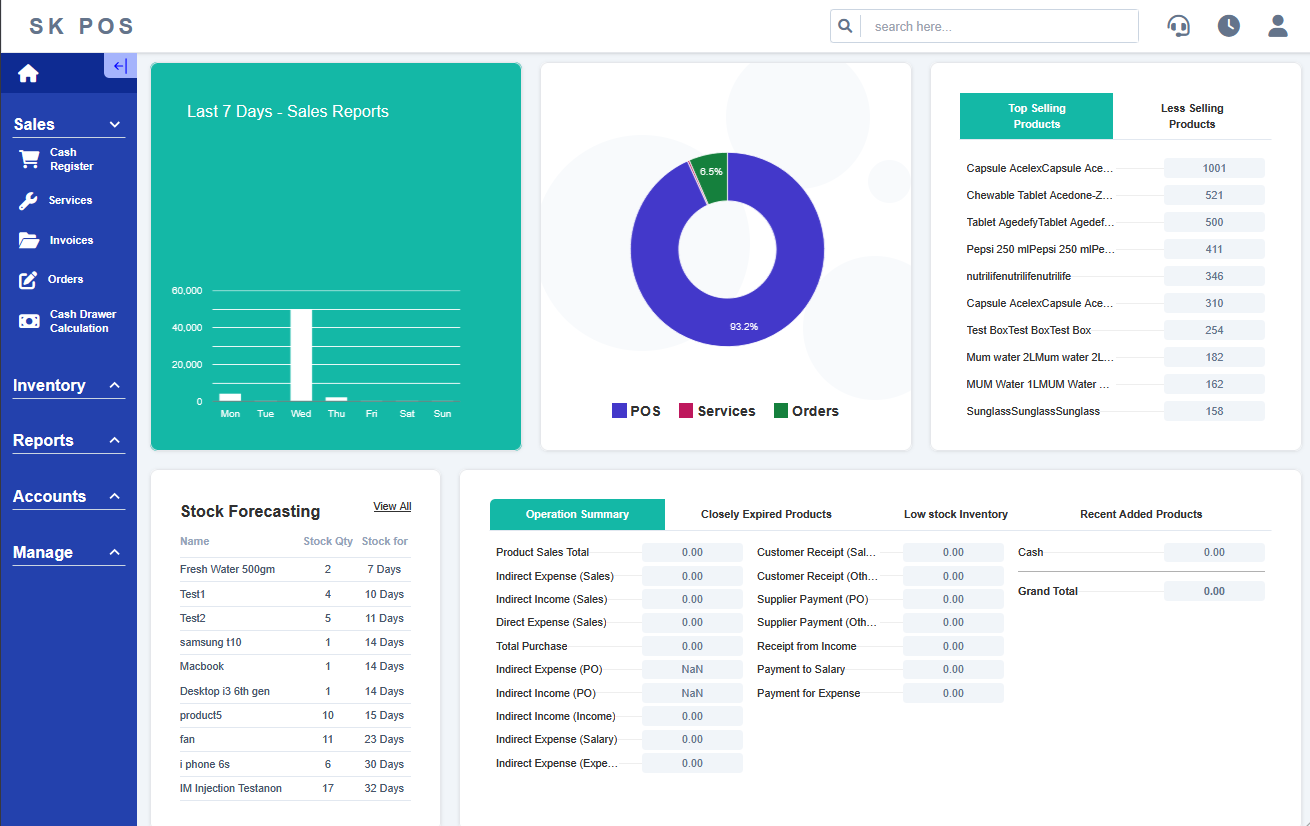
Think of it as the brain of your store. It not only handles transactions but also helps business owners make smarter decisions. To understand the difference: With modern POS software, businesses can save time, reduce errors, and improve customer satisfaction. POS software may seem complex, but it works in a few simple steps: Cashier scans barcode or selects item on touchscreen. POS instantly pulls price & tax. System adds items, applies discounts, loyalty points and promotions automatically. Accept cash, cards, mobile wallets or contactless payments securely. Inventory updates instantly, receipt is printed or emailed, and data is saved. Get instant insights on best-sellers, peak hours, employee performance and trends. Fixed setup at checkout counters. Includes hardware like cash drawers, barcode scanners, and printers. Ideal for retail stores and large shops. Runs on smartphones or tablets. Suitable for pop-up shops, delivery services, and small businesses. Allows sales on the go. Hosted online, accessible anywhere. Automatic updates, backup, and multi-store management. Perfect for growing businesses and franchises. Custom systems for restaurants, cafes, salons, and hotels. Features include table management, appointment scheduling, and menu management. Track inventory by SKU, manage discounts & promotions, analyze sales trends. Table management, split bills, tip calculation, menu system & order tracking. Appointment scheduling, customer service history, beauty product inventory. Front-desk check-in/out, billing, room service management & booking integration. A: POS stands for Point of Sale, the place where a customer completes a purchase. A: Yes. It manages inventory, customer data, analytics, and payment processing. A: Some on-premise systems work offline, but cloud POS requires internet access. A: Yes, many POS systems connect with accounting, payroll, and e-commerce platforms. A: Any business that sells products or services, from small shops to large chains, benefits from POS systems. A: Modern POS software uses encryption, secure payment gateways, and access controls to protect data. At SK Soft Solutions Inc, we help businesses implement the perfect POS solution. Our systems are tailored to your industry and business size.
In today’s fast-paced world, POS software is not optional—it’s essential. It empowers business owners to manage sales efficiently, keep accurate inventory records, understand customer behavior, and make smarter business decisions. Whether you run a retail store, restaurant, salon, or hotel, a modern POS system improves efficiency, enhances the customer experience, and boosts profits.
Visit SK Soft Solutions Inc to learn how we can help your business thrive with the right POS software.POS Software
POS Software vs Cash Registers
Feature
Cash Register
POS Software
Process Payments
Basic
Cash, cards, wallets
Inventory Tracking
No
Yes
Customer Data Management
No
Yes
Reporting & Analytics
No
Yes
Multi-location Support
No
Yes
How POS Software Works
Scanning or Selecting Products
Calculating the Total
Processing Payments
Completing the Sale
Reports & Analytics
Core Features of POS Software
Types of POS Systems
1. Traditional Countertop POS
2. Mobile POS (mPOS)
3. Cloud POS Systems
4. Industry-Specific POS
Benefits of Using POS Software
Industry Use Cases of POS Software
Retail Stores
Restaurants & Cafes
Salons & Spas
Hotels
FAQs About POS Software
Q1: What does POS stand for?
Q2: Is POS software better than a cash register?
Q3: Can I use POS offline?
Q4: Can POS integrate with accounting software?
Q5: What types of businesses need POS software?
Q6: How secure is POS software?
Tips for Choosing the Right POS System
Why Your Business Needs POS Software
Conclusion